Changelog
Documenting our journey of creating a custom sign builder.

Redesigned customiser admin with live preview
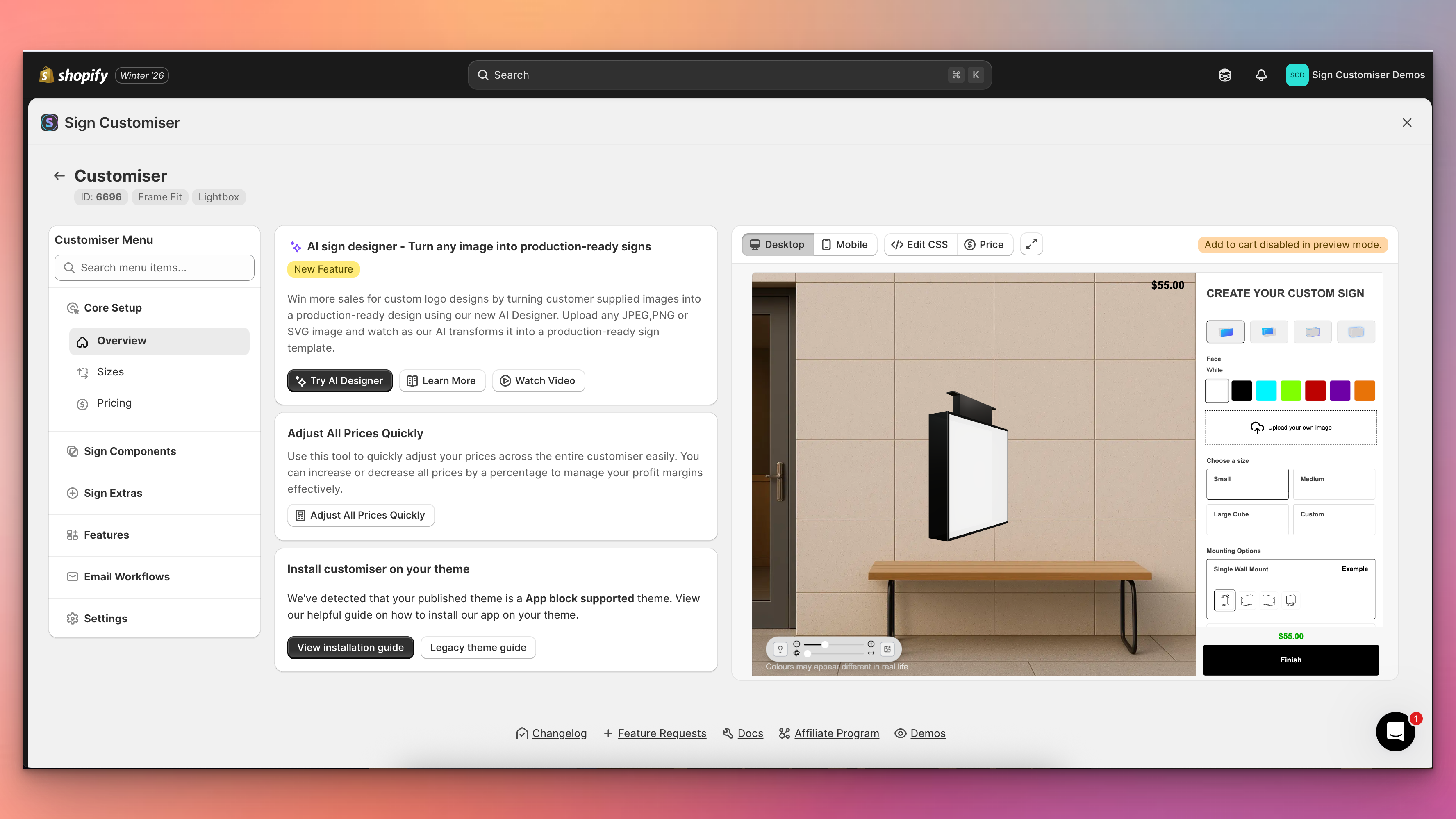
Sign Customiser’s admin experience has been transformed with a brand new three-column layout that puts your live customiser preview front and centre. You can now see exactly how your changes look in real-time without navigating away from your settings, making it faster and easier than ever to perfect your sign customiser.
What’s Changed
- Live preview panel - A persistent preview of your customiser now appears alongside your settings, automatically updating when you save changes to colours, fonts, sizes, materials, and other options
- Three-column layout - The new layout provides a collapsible navigation menu on the left, your current settings in the centre, and the live preview on the right for an efficient workflow
- Fullscreen preview mode - Click the expand button to view your customiser in a fullscreen modal for detailed inspection, with desktop and mobile view options
- Collapsible navigation - Menu sections can now be collapsed to focus on the areas you’re working with, and includes a quick search to jump directly to any setting
- Automatic preview refresh - Changes saved to forms, tables, and settings now automatically trigger a preview refresh, eliminating the need to manually reload
- Desktop and mobile preview switching - Easily toggle between desktop and mobile views directly from the preview controls bar to test your customiser on different devices
Add thumbnail images to selection buttons
Sign Customiser now lets you add thumbnail images to your selection buttons, making it easier for customers to visually identify different options at a glance. This works for materials (letter finishes), mountings, and backboard selections.
What’s Changed
- Button images for selections - Upload images that display directly on the selection buttons in the customiser sidebar
- Click to enlarge - Customers can click on button images to view them in a larger modal
- Easy management - Upload and manage button images from the material, mounting, or support editing screens in the admin
- Separate from popup images - Button images are distinct from the existing popup/example images that appear when customers click the info icon
Earn credits by referring other sign businesses
Know another sign business that could use Sign Customiser? Now you can both earn credits when they join. Share your personal referral link with fellow sign makers—when they subscribe, you get 10 bonus credits. When they make their first credit purchase, you both get 50% bonus credits on top.
What’s Changed
- Earn credits for referrals – Get 10 credits when someone you refer subscribes to Sign Customiser, plus 50% bonus credits when they make their first purchase
- Both parties benefit – Referred businesses also receive 50% bonus credits on their first credit purchase, so there’s something in it for everyone
- Share however works for you – Copy your unique referral link, share your code directly, or send email invitations straight from your dashboard
- 90-day tracking – Your referral link stays active for 90 days, so contacts who sign up later still count as your referral
- No pressure timing – Referred businesses can apply a referral code any time before they subscribe, giving them flexibility to explore first
Flow RGB animated outline effect
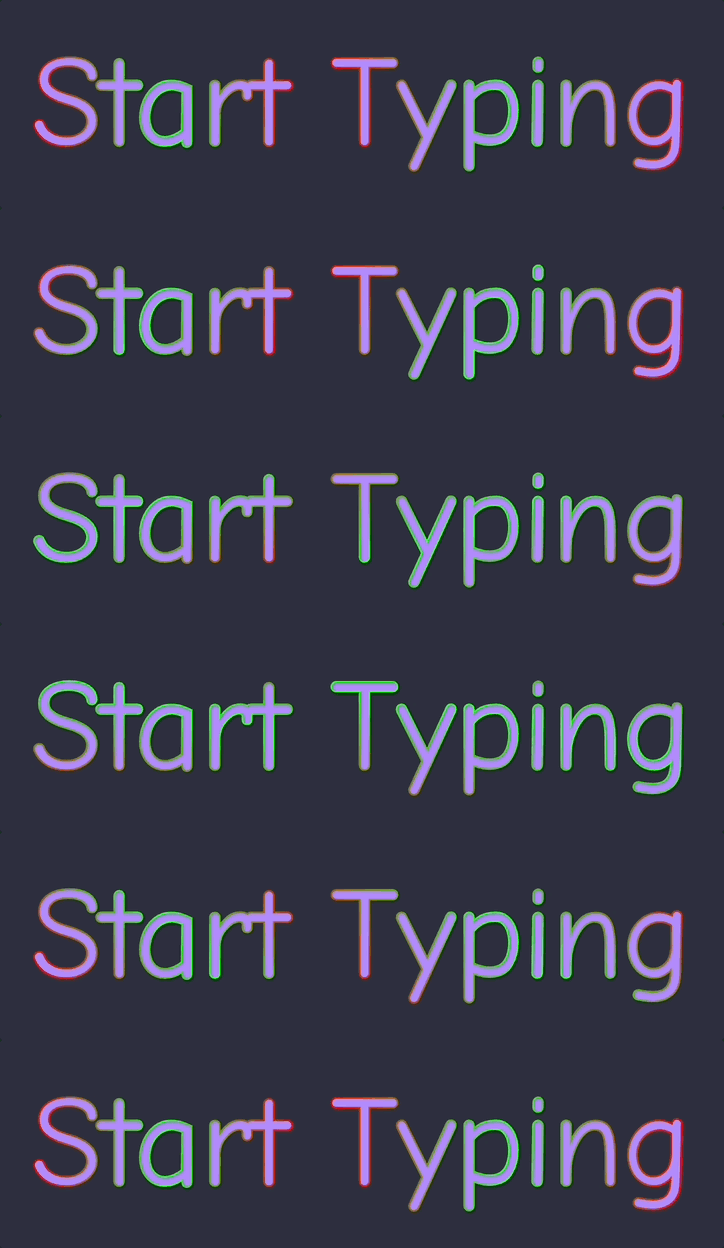
Sign Customiser’s Flow RGB effect has been completely redesigned. Instead of filling the entire shape with animated colours, the effect now animates along the outline of your text and logo designs. This creates a more realistic neon tube simulation and unlocks the ability to use Flow RGB alongside a face colour for the first time.
What’s Changed
- Animated outline effect - The Flow RGB colours now cycle smoothly along the stroke/outline of text and SVG shapes, creating a realistic flowing neon tube appearance
- Works with UV colours - You can now combine Flow RGB with a solid UV colour, where the animated gradient appears as an outline around the filled shape
- AI sign design support - AI sign designs now display the same animated outline effect with thicker, more visible strokes optimised for complex shapes
Step-by-step undo for text and AI Sign Designer Custom Logos
Sign Customiser now gives your customers the power to undo their design changes step by step. Whether they’re adjusting text positions, changing colours, or fine-tuning AI Sign Designer Custom Logos, every edit is tracked and can be reversed with a single click.
What’s Changed
- Step-by-step undo button - A new undo button in the control bar lets customers reverse their most recent change, whether it’s moving text, adjusting a logo, or changing colours
- Full history tracking - Up to 50 design states are stored, allowing customers to step back through multiple changes if they take a wrong turn during customisation
- Works across all elements - Undo support covers text elements, AI Sign Designer Custom Logos, position adjustments, colour changes, and font selections
- Persistent across sessions - When local cache is enabled, the undo history is preserved even if the customer refreshes the page or returns later
Snap to grid for precise sign alignment
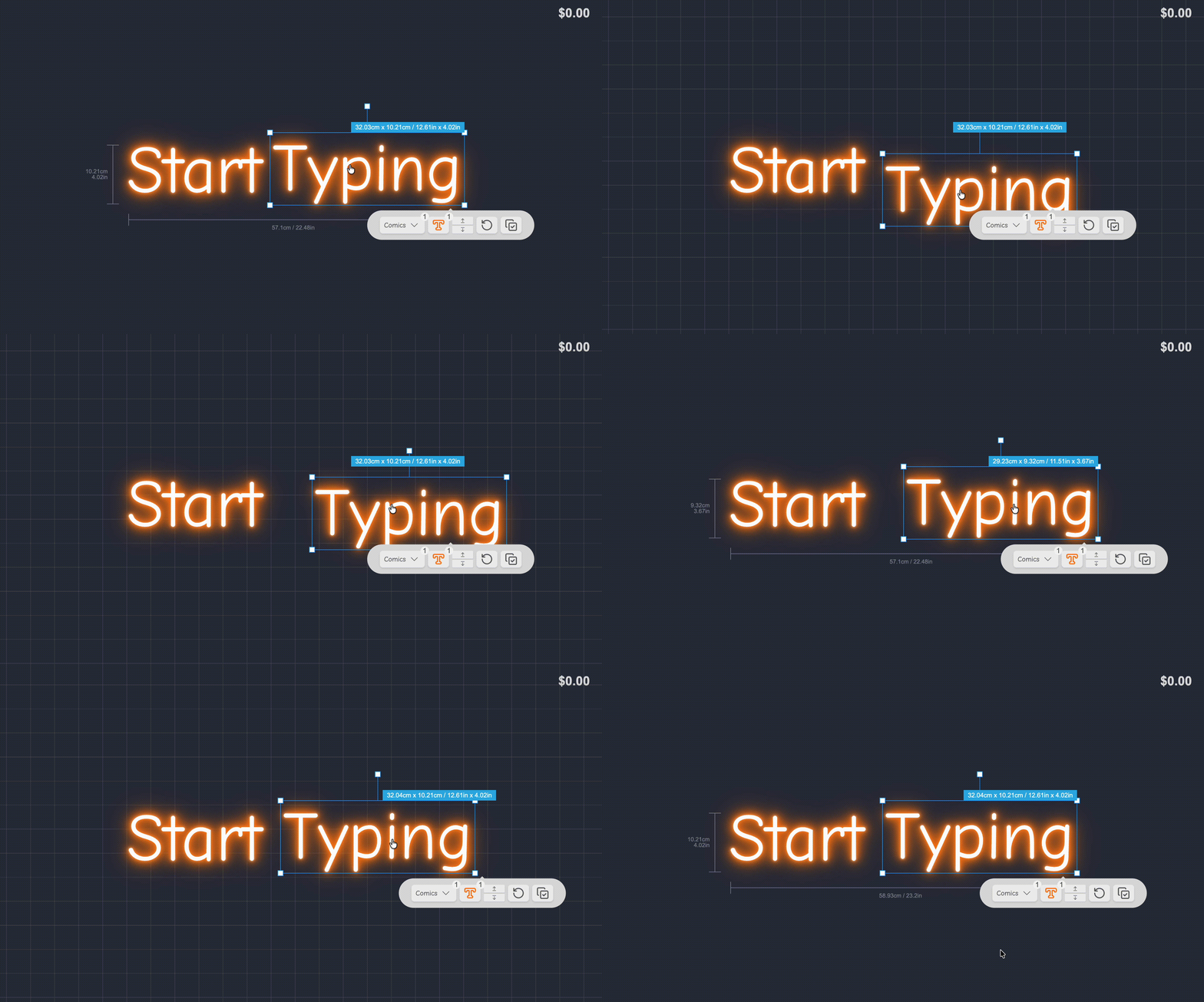
Help your customers create perfectly aligned sign designs with the new snap to grid feature. When enabled, dragging sign parts will snap them to a 20px grid, making it easier to position words, icons, and other elements with precision.
What’s Changed
- Grid snapping - All draggable sign elements now snap to a 20px grid when this feature is enabled, ensuring consistent spacing and alignment across designs.
- Easier alignment - Customers can create professional-looking layouts without the frustration of trying to manually align elements by eye.
How to Enable
Navigate to your customiser settings page to enable snap to grid for your store.
Enter measurements in inches and pounds
You can now configure your preferred measurement and weight units for the Sign Customiser admin interface. Choose between centimetres or inches for measurements, and kilograms or pounds for weights, making it easier to work with the units you’re most familiar with.
How to enable
Learn how to enable this feature by checking out our documentation:
[/help/faqs/admin-measurement-units/)
Important note
These settings only affect how you enter measurements and weights in the admin interface. They do not change what units are displayed to your customers in the customiser itself.
Conversion warning: When using inches or pounds, we convert and store your values as centimetres or kilograms respectively. This conversion may cause small rounding differences. For the most precise measurements and weights, we recommend using centimetres and kilograms directly.
Rotation data now included in order details
Sign Customiser now includes rotation information directly in your order details. When customers rotate individual letters or elements in their custom sign designs, those rotation angles are captured and displayed alongside other manufacturing specifications, eliminating guesswork during production.
What’s Changed
- Rotation angles in product descriptions - When a sign element has been rotated, the exact degree of rotation is now displayed in the order details alongside dimensions and other specifications
- Customisable rotation label - Merchants can customise the “Rotation” label text through the Labels settings to match their preferred terminology
- Accurate manufacturing data - Rotation values are shown with degree precision, ensuring your production team has the exact orientation for each element
Enhanced visualiser controls and navigation
Sign Customiser’s visualiser now offers more intuitive ways to explore and perfect your sign designs. Whether you’re positioning your sign against a background image or getting a closer look at fine details, these new controls put you in the driver’s seat.
What’s Changed
- Pan and zoom support - Drag the visualiser stage around and zoom in or out to get the perfect view of your design. This is particularly useful when positioning signs against background images for realistic previews.
- Unified control bar - The light, background, and share controls are now consolidated into a single convenient control bar. Merchants can enable this by updating their Control Location settings in the admin.
- Improved custom shape backboard interaction - Custom shape backboards can now be dragged within their defined content area without accidentally resizing the backboard itself, giving you more precise control over sign placement.
Enhanced SVG colour controls and gradient preview icons
Sign Customiser now offers more powerful controls for SVG logo customisation. When your customers upload SVG designs, they can now remove the face colour entirely to create outline-only effects, and the system intelligently matches the original SVG colours to your predefined colour selections.
We’ve also improved the visual experience when using RGB or Flow colour options - the sidebar icons now display a striking diagonal gradient showing all the available colours, rather than appearing blank.
What’s Changed
- SVG face colour removal - A new “none” option lets customers remove the face colour from individual SVG shapes or all shapes at once, creating clean outline-only designs
- Intelligent SVG colour matching - When an SVG is uploaded, its colours are automatically matched to the closest predefined face, tube, and halo colours using advanced colour distance calculations
- RGB/Flow gradient icons - Colour icons in the sidebar now display a diagonal gradient preview when RGB or Flow multicolour options are selected
- Fixed tab switching stability - Resolved an issue where position coordinates could inadvertently update when switching between text editor and SVG editor tabs
- Improved SVG style detection - SVG elements now correctly detect inherited colours from parent elements and CSS classes, ensuring accurate colour representation
