


How to integrate Sign Customiser in Squarespace
To integrate Sign Customiser with Squarespace, you need to subscribe to our Universal plan.
Steps to integrate:
- Log in to your Sign Customiser account.
- Create your customiser.
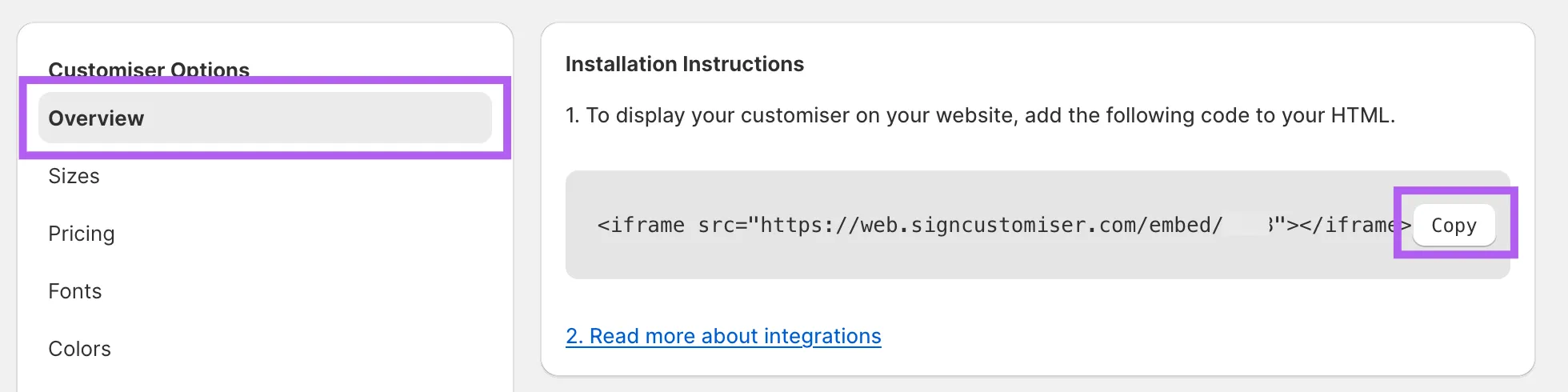
- Navigate to Overview settings in the menu of your customiser.
- Click Copy to copy the embed code.
Embedding Sign Customiser in Squarespace
- Log into your Squarespace account.
- Create a new page or select an existing page where you want to display the customiser.
- Add a new Section.
- Add a new Block and choose Code element.
- Paste the copied code into the element.
(Optional) If the customiser does not fill the container, ensure your iframe includes width and height styling. Replace YOUR_CUSTOMISER_ID with the actual ID of your customiser:
<iframe src="https://web.signcustomiser.com/embed/YOUR_CUSTOMISER_ID" style="width:100%; height:100%"></iframe>
For help finding your ID, refer to our guide: Find Your Sign Customiser ID.
Consult our Squarespace Integration guide for further details.
