Changelog
Documenting our journey of creating a custom sign builder.

Categorised Shopify product types for generated signs
Sign Customiser now gives each newly generated Shopify product a product type that matches its sign category. This makes it easier to build collections, shipping rules and other Shopify automations for different kinds of signs.
What’s Changed
- Product types now match the sign - New acrylic, metal, stencil, wooden, aluminium, braille, wood-frame and lightbox products receive their own clear product type.
- Neon remains familiar - New neon products keep the existing
Custom Neonproduct type, so established neon workflows continue to work. - Existing products stay unchanged - The new product types apply when Sign Customiser creates a product. Products already in Shopify are not renamed.
Lightbox signs that size themselves to your artwork
Lightbox signs are almost always made to specific dimensions, so we have made the size follow the artwork. When a customer uploads an image to the face of a lightbox sign, the sign now reshapes itself to match the image’s proportions, scaled to sit within the sign’s size limits. Customers get a result that matches what they uploaded, without working out the right dimensions by hand.
What’s Changed
- Lightbox signs match your uploaded image - When a customer uploads artwork to the face of a lightbox sign, the sign’s custom width and height adopt the image’s proportions automatically, scaled to fit within the allowed size range. The size selection switches to Custom for them, so what they see on screen is what gets made.
- Custom sizes by default for new lightbox signs - New lightbox customisers start in custom-size mode with no preset size tiers, matching how lightbox signs are really quoted and produced. You stay in control: your existing customisers are left exactly as they are, and you can still offer preset sizes whenever you want them.
- Flexible artwork cropping - Customers can crop an uploaded image to any shape rather than being forced into a fixed square, which makes it far easier to fit logos and artwork to bespoke sign dimensions.
- Uploads stay put when resizing - Artwork a customer has already added is kept when the sign size changes, so adjusting the dimensions no longer clears the image they uploaded.
Measurement labels on the lightbox 3D preview
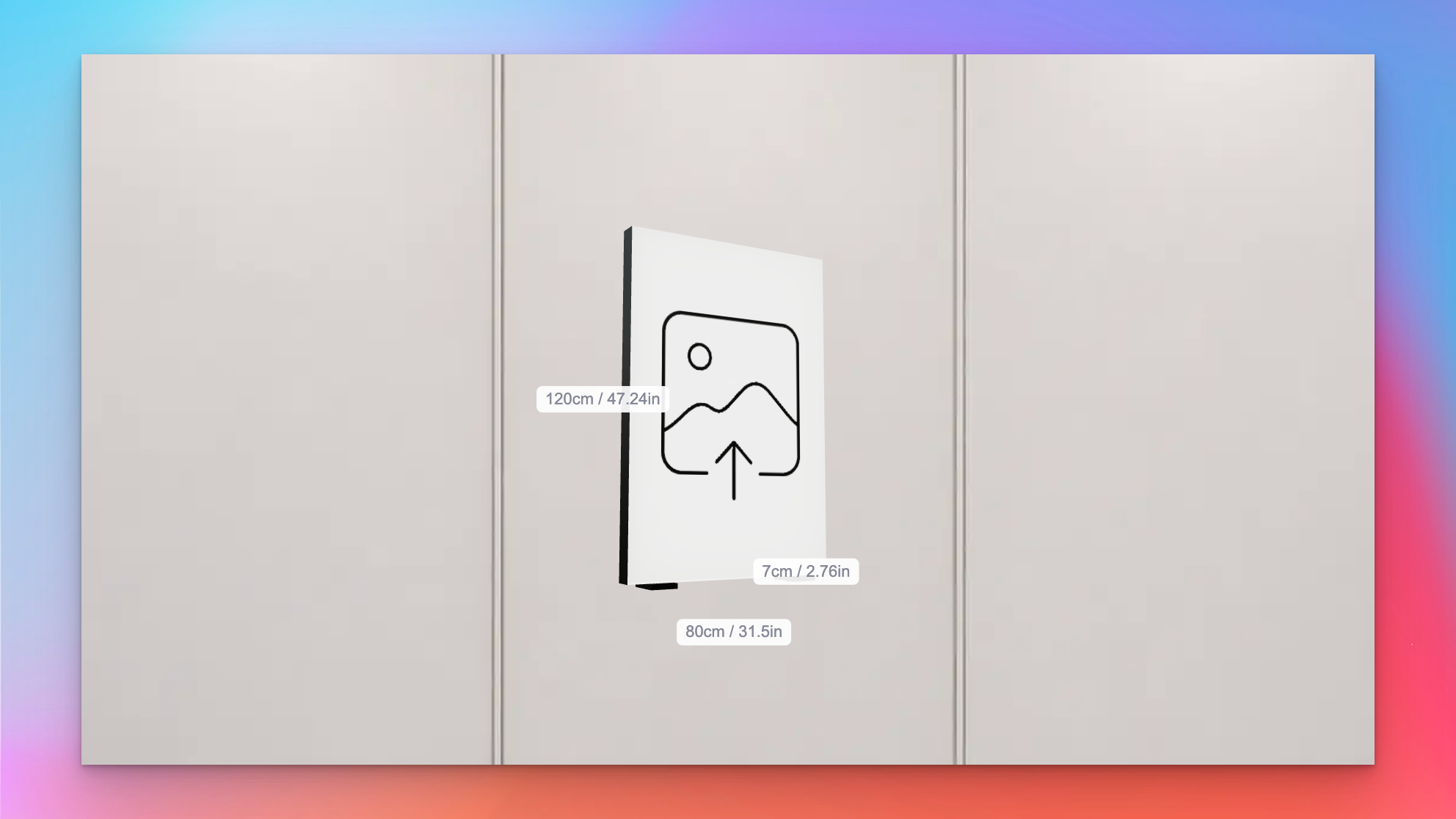
Sign Customiser now shows measurement labels on the lightbox 3D preview, so customers can see exactly how big their sign will be as they design it. Width, height, and depth sit alongside the relevant edges of the sign and update in real time whenever the size changes, removing the guesswork when someone is deciding between sizes.
What’s Changed
- Live measurement labels on the 3D preview - Width, height, and depth float next to the matching edges of the lightbox, so customers can see the physical size of the sign while they rotate and customise it
- Metric, imperial, or both - Labels respect the customiser’s measurement system setting and can display in centimetres, inches, or both side by side for stores that ship to mixed markets
- Individually toggleable - Each dimension can be shown or hidden on its own, so merchants can surface only the measurements that matter for their product — for example, hiding depth on very slim signs
- Accurate for custom sizes - The frame-fit custom size branch now feeds the same measurements through to the preview, so bespoke dimensions appear on the labels instead of falling back to the last preset size
Pedestal and sign feet mounting options for lightbox signs
Sign Customiser now supports floor-standing lightbox sign installations. Two new mounting visualisations — Pedestal and Sign Feet — render the sign the way it actually stands on the ground, so customers can picture a pylon-style sign on a forecourt or a freestanding lightbox on a counter before they buy. Merchants can fine-tune the proportions to match the hardware they ship.
What’s Changed
- Pedestal mounting visualisation - A vertical pole sits behind the lightbox with a base plate extending along the ground, giving customers a realistic preview of pylon-style and freestanding floor signs
- Sign Feet mounting visualisation - Two feet mount under the lightbox, inset from each side edge, with base plates that extend in front and behind the sign for stability — ideal for countertop and tabletop lightboxes
- Configurable dimensions - Merchants can tune the pedestal pole width and base depth, or adjust the sign feet base depth, post height, and inset from the edge, so the preview matches the mounting hardware they actually sell
- Flush-mount sign feet - Setting post height to zero renders feet flush against the bottom of the sign, supporting more compact tabletop designs
- Accurate 3D preview - The new mounts render alongside the existing wall-mount and prong visualisations, giving customers a full picture of how their lightbox will look once installed
Slim lightbox designs with recessed borders
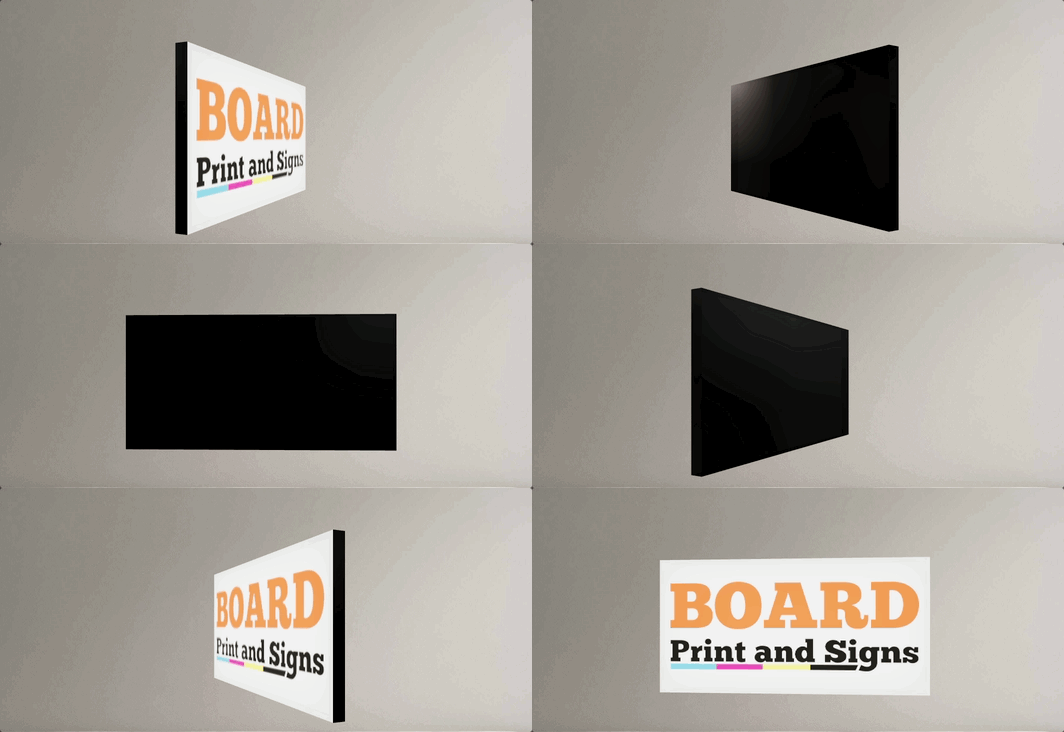
Sign Customiser now fully supports slim lightbox designs inside the customiser. If your lightbox signs only illuminate from one side — like a wall-mounted sign that doesn’t need a lit back panel — the 3D preview now accurately reflects this by showing the border trim on any disabled sides. You can also enable recessed borders for a cleaner, more modern look where the border sits flush with the face rather than overlapping it.
What’s Changed
- Slim (single-sided) lightbox support - Lightbox signs with inactive sides are now officially supported in the customiser. Disabled sides display the border colour instead of a lit panel, giving customers an accurate preview of how the finished sign will look
- Recessed border option - A new setting allows merchants to enable recessed borders on lightbox signs, removing the visible trim overlay from the face and back panels for a sleek, frameless appearance
- Accurate 3D preview - The lightbox renderer correctly hides glow effects and images on inactive sides, so the preview matches the real product — whether it’s a single-sided wall sign or a fully illuminated hanging lightbox
- Works across all lightbox shapes - Box, circle, and oval lightbox shapes all support inactive sides and recessed borders
- Automatic border trim enforcement - The admin and customiser now ensure lightbox signs always have the required border trim colour assigned, preventing incomplete configurations from reaching your customers
Enhanced admin UI for channel letter and lightbox signs
Sign Customiser has redesigned the merchant admin experience specifically for channel letter and lightbox sign configuration. The enhanced interface makes it easier to set up and manage the complex multi-component structure of illuminated signs with clearer terminology, nested navigation, and context-aware guidance.
What’s Changed
- Letter Components navigation - The “Letter Types” section has been renamed to “Letter Components” with new nested navigation, making it intuitive to configure the building blocks of channel letter and lightbox signs
- Clearer component structure - Better visual organisation helps you understand how face, sides, trim, back-lit (halo), borders, and internal lighting components fit together
- Context-aware setup guidance - Onboarding instructions now specifically explain how to configure channel letter components (like 3D Illuminated Letters with face, sides, trim) and lightbox components (face, back, sides, borders)
- Enhanced colour previews - Visual colour swatches now appear throughout the admin interface, making it easier to manage the multiple colour options available for different sign components
- Improved product type forms - The interface for assigning colours, materials, and pricing to individual letter components has been redesigned for better clarity
- Frame Fit pricing clarity - Setup instructions for lightbox signs now clearly explain the area-based pricing calculation (width × height) used for frame-focused designs
- Better visual hierarchy - Cards and tables have been refined to reduce clutter when working with multi-layered component configurations
