Changelog
Documenting our journey of creating a custom sign builder.
Page 5 of 18

EPS and Illustrator-compatible vector exports
Sign Customiser now produces EPS and Illustrator-compatible PDF files alongside the existing SVG, so the designs you hand off to your production team land in whichever format their cutters, routers, and design software expect. No more chasing conversions between finalising a sale and sending the job to fabrication.
Once enabled for a customiser, the extra formats flow through the same channels as SVG today — customer design files, product images, manufacturer emails, and the admin font tool — with no extra steps for you or your customers.
What’s Changed
- EPS downloads - Universally supported across cutting, routing, and plotting software, so files drop straight into your fabrication workflow
- Illustrator-compatible PDF - Opens cleanly in Adobe Illustrator for designers who prefer to tweak artwork before production
- Per-customiser toggles - Turn EPS and Illustrator exports on only for the customisers that need them, keeping storage lean everywhere else
- Manufacturer email links - New download links appear in the custom design email sent to your production team whenever the formats are enabled
- Admin font tool - The SVG generator in the admin now offers matching EPS and Illustrator downloads so you can pull finished artwork directly from the dashboard
- AI sign designer files - Uploaded logos processed through the AI sign designer are converted automatically once the settings are enabled
Measurement labels on the lightbox 3D preview
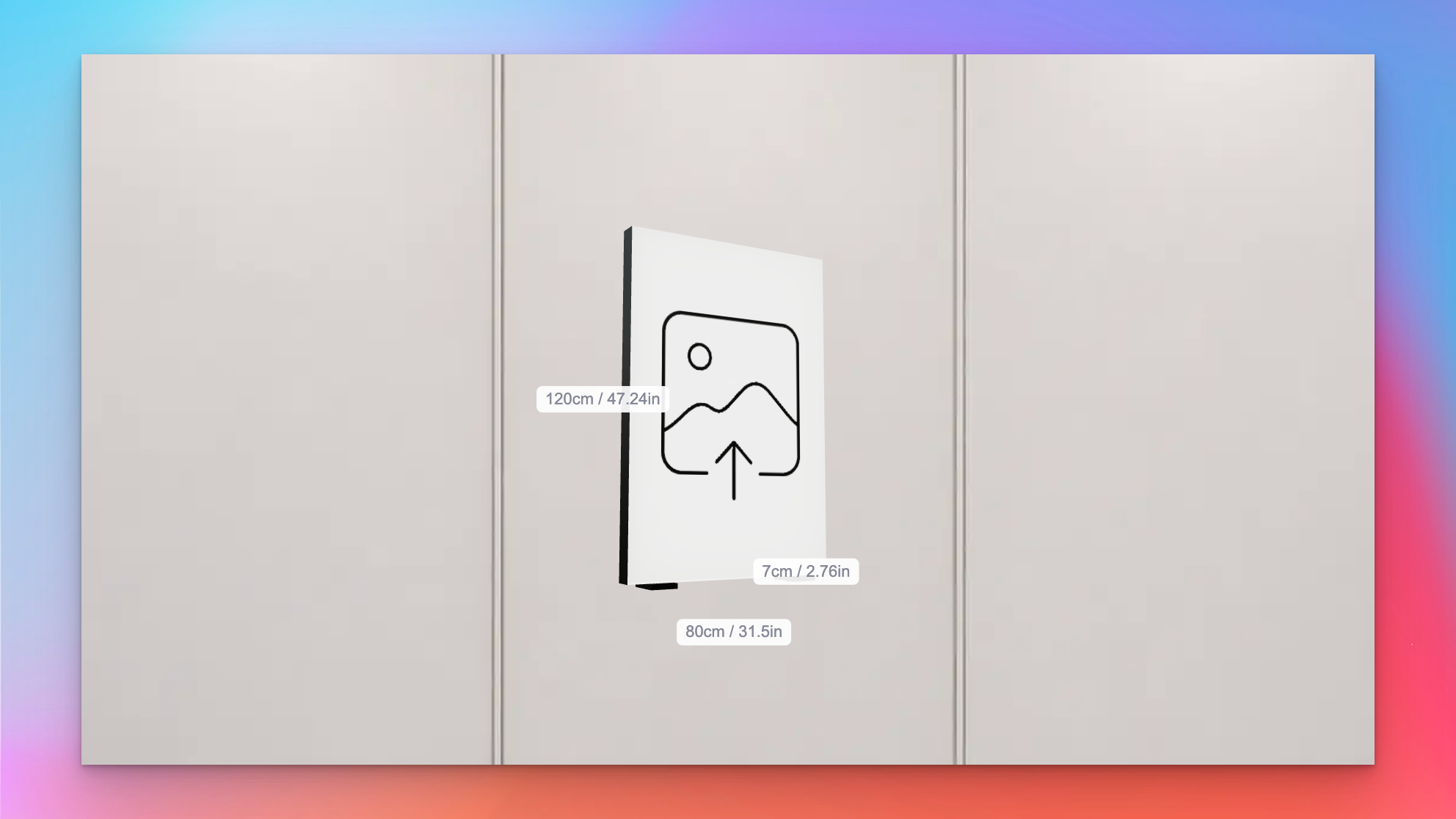
Sign Customiser now shows measurement labels on the lightbox 3D preview, so customers can see exactly how big their sign will be as they design it. Width, height, and depth sit alongside the relevant edges of the sign and update in real time whenever the size changes, removing the guesswork when someone is deciding between sizes.
What’s Changed
- Live measurement labels on the 3D preview - Width, height, and depth float next to the matching edges of the lightbox, so customers can see the physical size of the sign while they rotate and customise it
- Metric, imperial, or both - Labels respect the customiser’s measurement system setting and can display in centimetres, inches, or both side by side for stores that ship to mixed markets
- Individually toggleable - Each dimension can be shown or hidden on its own, so merchants can surface only the measurements that matter for their product — for example, hiding depth on very slim signs
- Accurate for custom sizes - The frame-fit custom size branch now feeds the same measurements through to the preview, so bespoke dimensions appear on the labels instead of falling back to the last preset size
Pedestal and sign feet mounting options for lightbox signs
Sign Customiser now supports floor-standing lightbox sign installations. Two new mounting visualisations — Pedestal and Sign Feet — render the sign the way it actually stands on the ground, so customers can picture a pylon-style sign on a forecourt or a freestanding lightbox on a counter before they buy. Merchants can fine-tune the proportions to match the hardware they ship.
What’s Changed
- Pedestal mounting visualisation - A vertical pole sits behind the lightbox with a base plate extending along the ground, giving customers a realistic preview of pylon-style and freestanding floor signs
- Sign Feet mounting visualisation - Two feet mount under the lightbox, inset from each side edge, with base plates that extend in front and behind the sign for stability — ideal for countertop and tabletop lightboxes
- Configurable dimensions - Merchants can tune the pedestal pole width and base depth, or adjust the sign feet base depth, post height, and inset from the edge, so the preview matches the mounting hardware they actually sell
- Flush-mount sign feet - Setting post height to zero renders feet flush against the bottom of the sign, supporting more compact tabletop designs
- Accurate 3D preview - The new mounts render alongside the existing wall-mount and prong visualisations, giving customers a full picture of how their lightbox will look once installed
Official Etsy integration
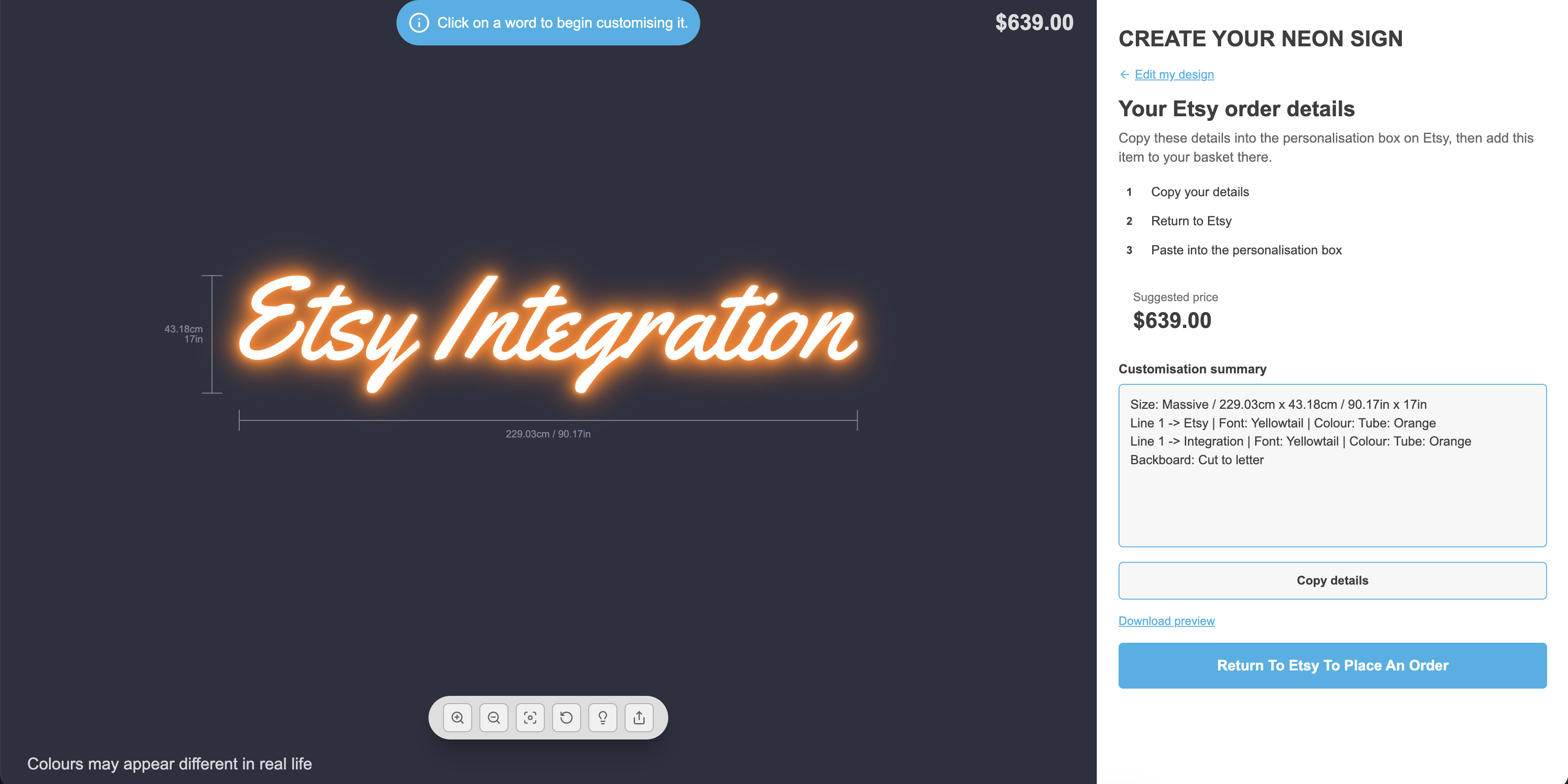
Sign Customiser now officially supports Etsy. Previously Etsy sellers had to piece together their own workarounds — from today, Etsy is a first-class integration you can activate once from the Integrations page, and every customiser you own can pair with your Etsy listings. Customers design their sign on your Customiser Link, copy a neatly formatted summary of their design, paste it into the Etsy personalisation box, and check out on Etsy as normal. No Shopify store required, and no back-and-forth emails to confirm the details.
What’s Changed
- Official Etsy integration - Activate Etsy once from Integrations and it applies to every customiser you own, so there is no per-customiser toggle to manage
- Listing settings per customiser - Paste in an optional Etsy listing URL and choose whether to show the estimated price for each customiser
- Structured design summary - Customers get a clean, copy-ready summary covering size, every line of text, colours, and any selected options ready for the Etsy personalisation box
- “Return To Etsy” call to action - A prominent button takes customers straight to your configured Etsy listing to complete their order
- Optional price display - Show or hide the estimated price on the summary screen to match how you’ve priced the listing on Etsy
- Etsy card in the admin - A new Etsy card sits alongside your other integrations with step-by-step onboarding instructions
- Works with hosted pages - All customisers are automatically treated as Customiser Link compatible while Etsy is active, so you can share a single link with your Etsy buyers
Read the full walkthrough in our Etsy integration guide, or explore the Etsy integration overview to see how Sign Customiser pairs with Etsy listings.
Clickable links in customiser descriptions
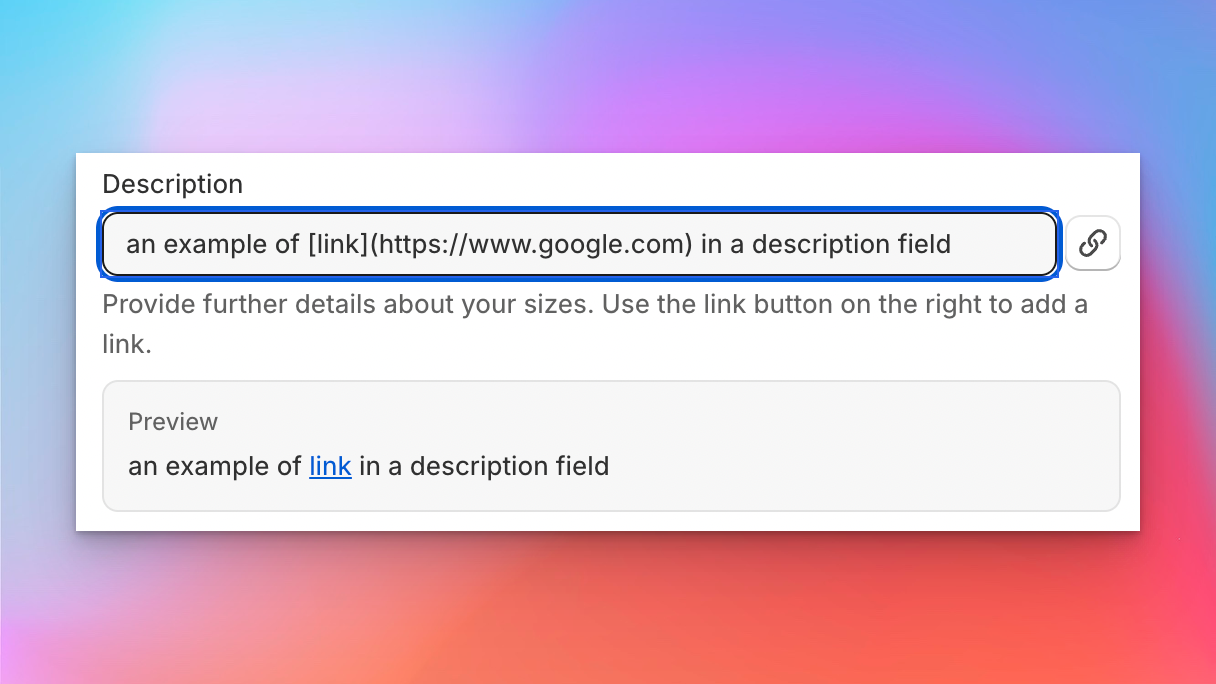
Sign Customiser now lets you add clickable links inside the descriptions and help text that customers read while they’re designing their sign. Point customers at a mounting guide, installation video, size chart, or a “contact us” link without ever taking them out of the flow, all using a simple Markdown link format your merchants will already recognise.
This is a small quality-of-life upgrade that unlocks a lot: fewer support questions, better-informed buyers, and a cleaner way to surface the helpful content you already have on your store.
What’s Changed
- Markdown links in option descriptions - Use
[label](url)inside descriptions for colours, sizes, materials, mounting, supports, jackets, product types, and custom form fields to turn any word or phrase into a link - Links render safely for customers - Customer-facing descriptions automatically become clickable, opening external links in a new tab and keeping internal or anchor links in the same tab
- Supports the link types you actually use - Works with full URLs, your own store paths like
/pages/mounting-guide, in-page anchors,mailto:email links, andtel:phone links - Inline admin hint - Every supported field now shows a short help note with example syntax, so merchants can see at a glance how to add a link without leaving the form
- Plain text still works as before - Existing descriptions keep rendering exactly as they do today, so there’s nothing to migrate
- Markdown links in option descriptions - Use
Automated pricing updates via the API
Sign Customiser’s API now supports full pricing management, giving merchants the ability to read and update their customiser pricing automatically. Whether you’re a power user running scheduled scripts or a merchant looking to keep pricing in sync with your business systems, this update puts you in control.
Rather than manually adjusting prices through the dashboard each time costs change, you can now automate the process entirely. Build a scheduled task that pulls your latest supplier rates and pushes updated pricing to Sign Customiser, or connect your inventory system to adjust prices in real time as material costs fluctuate.
What’s Changed
- Read pricing via API - Retrieve the full pricing configuration for any customiser, including sizes, base pricing, and price lists
- Update pricing via API - Replace pricing configuration automatically with a single PUT request, covering base prices, letter prices, size tiers, and price lists
- Works with all pricing models - Supports Fixed Width, Material Length, and Frame Fit pricing models
Example Use Cases
- Shipping cost updates - Shipping rates change regularly. Set up a scheduled task that fetches your latest carrier rates and automatically updates shipping surcharges across all your customisers, so customers always see accurate totals
- Seasonal pricing - Run a cron job that applies seasonal pricing adjustments at specific dates, such as holiday surcharges or off-peak discounts, without lifting a finger
- Supplier cost sync - When your material supplier updates their price sheet, a script can recalculate your margins and push new pricing to every affected customiser in seconds
- Multi-currency adjustments - Automatically adjust pricing based on daily exchange rates for international storefronts
- Bulk price changes - Update pricing across dozens of customisers at once from a single script, instead of editing each one individually
For implementation details and API reference, visit our Custom API Integration guide.
UTM parameter tracking for marketing attribution
Sign Customiser now automatically captures UTM parameters — utm_source, utm_medium, utm_campaign, utm_term, and utm_content — from your customers’ browsing sessions and threads them through to your form submissions, notification emails, and webhook payloads. This gives you full visibility into which marketing campaigns are driving quote requests and sign orders.
What’s Changed
- Automatic UTM capture - UTM parameters are detected from the storefront URL and persisted in session storage so they survive page navigation
- UTM data in form submissions - Quote requests and custom design submissions now include UTM tracking data, so you can attribute every lead to the campaign that brought them in
- Marketing attribution in order emails - Merchant notification emails now display a UTM tracking section when parameters are present, making it easy to match enquiries to campaigns
- Webhook enrichment - UTM parameters are included in webhook payloads, allowing your CRM, analytics tools, or automation workflows to process attribution data automatically
- Cross-iframe support - UTM data is correctly passed through to the customiser when embedded via iframe on Shopify, WooCommerce, or hosted pages
Export orders as CSV via email
Sign Customiser now lets you export your orders as a CSV spreadsheet, delivered directly to your email. Whether you need last month’s orders for bookkeeping, a full year for reporting, or a custom date range for a specific campaign — just pick a range, hit export, and the file will land in your inbox within minutes.
What’s Changed
- One-click preset ranges - Quickly export orders from the last 7 days, last 30 days, last quarter, or all time without touching a calendar
- Custom date range picker - Use the built-in calendar to select any start and end date for a tailored export
- Delivered to your inbox - Exports are processed in the background and emailed as a CSV attachment to the address on your account, so you can keep working while it runs
- Detailed order data - Each row includes customer details, sign configuration, pricing, and all selected options so you have a complete picture of every order
Slim lightbox designs with recessed borders
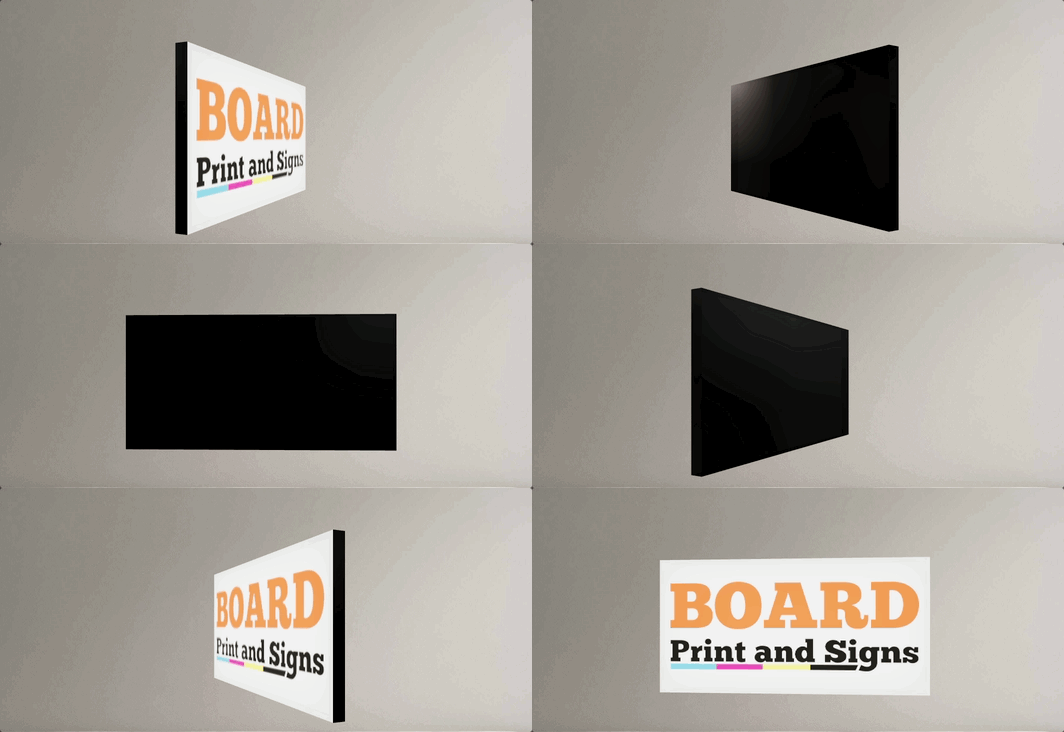
Sign Customiser now fully supports slim lightbox designs inside the customiser. If your lightbox signs only illuminate from one side — like a wall-mounted sign that doesn’t need a lit back panel — the 3D preview now accurately reflects this by showing the border trim on any disabled sides. You can also enable recessed borders for a cleaner, more modern look where the border sits flush with the face rather than overlapping it.
What’s Changed
- Slim (single-sided) lightbox support - Lightbox signs with inactive sides are now officially supported in the customiser. Disabled sides display the border colour instead of a lit panel, giving customers an accurate preview of how the finished sign will look
- Recessed border option - A new setting allows merchants to enable recessed borders on lightbox signs, removing the visible trim overlay from the face and back panels for a sleek, frameless appearance
- Accurate 3D preview - The lightbox renderer correctly hides glow effects and images on inactive sides, so the preview matches the real product — whether it’s a single-sided wall sign or a fully illuminated hanging lightbox
- Works across all lightbox shapes - Box, circle, and oval lightbox shapes all support inactive sides and recessed borders
- Automatic border trim enforcement - The admin and customiser now ensure lightbox signs always have the required border trim colour assigned, preventing incomplete configurations from reaching your customers
AI Sign Designer now supports Material Length pricing
The AI Sign Designer just got a major expansion. Merchants using the Material Length pricing model can now offer AI-powered sign design directly in their customisers, opening up precise, path-based pricing for customer-uploaded artwork and AI-generated designs. We’ve also expanded Channel Letter sign support and made it faster than ever to get started with new demo templates.
What’s Changed
- Material Length pricing meets AI Sign Designer - Customisers using the Material Length model can now accept AI-generated SVG designs with accurate per-letter measurements and pricing. Customers upload an image or describe their sign, and the AI produces a design that’s measured and priced using your existing material length rules
- Channel Letter signs work with AI Sign Designer - Channel Letter product types are now fully supported in the AI Sign Designer flow, including face and halo colour effects, RGB options, and UV print colour preservation
- UV print colours preserved from AI artwork - When a customer uploads a multicolour design, the original fill colours from the AI artwork are automatically carried through as UV face print data, so what the customer sees in the preview matches what goes to production
- New demo templates for faster setup - The customiser creation flow now includes AI Sign Designer demo data for eligible product types, so merchants can launch a fully configured customiser with AI design capabilities in just a few clicks
- Streamlined onboarding - The standalone onboarding card has been replaced with an integrated setup experience that seeds AI Sign Designer settings alongside your demo data, reducing the steps needed to go live
