NewTurn any image into a sign design.
Changelog

Changelog

Documenting our journey of creating a custom sign builder.

Filtered by:feature(185 updates)Page 7 of 19

Stay informed with updates every month

Or subscribe to ourRSS feed

Apr 22, 2026

2026.4

Measurement labels on the lightbox 3D preview

Sign Customiser now shows measurement labels on the lightbox 3D preview, so customers can see exactly how big their sign will be as they design it. Width, height, and depth sit alongside the relevant edges of the sign and update in real time whenever the size changes, removing the guesswork when someone is deciding between sizes.
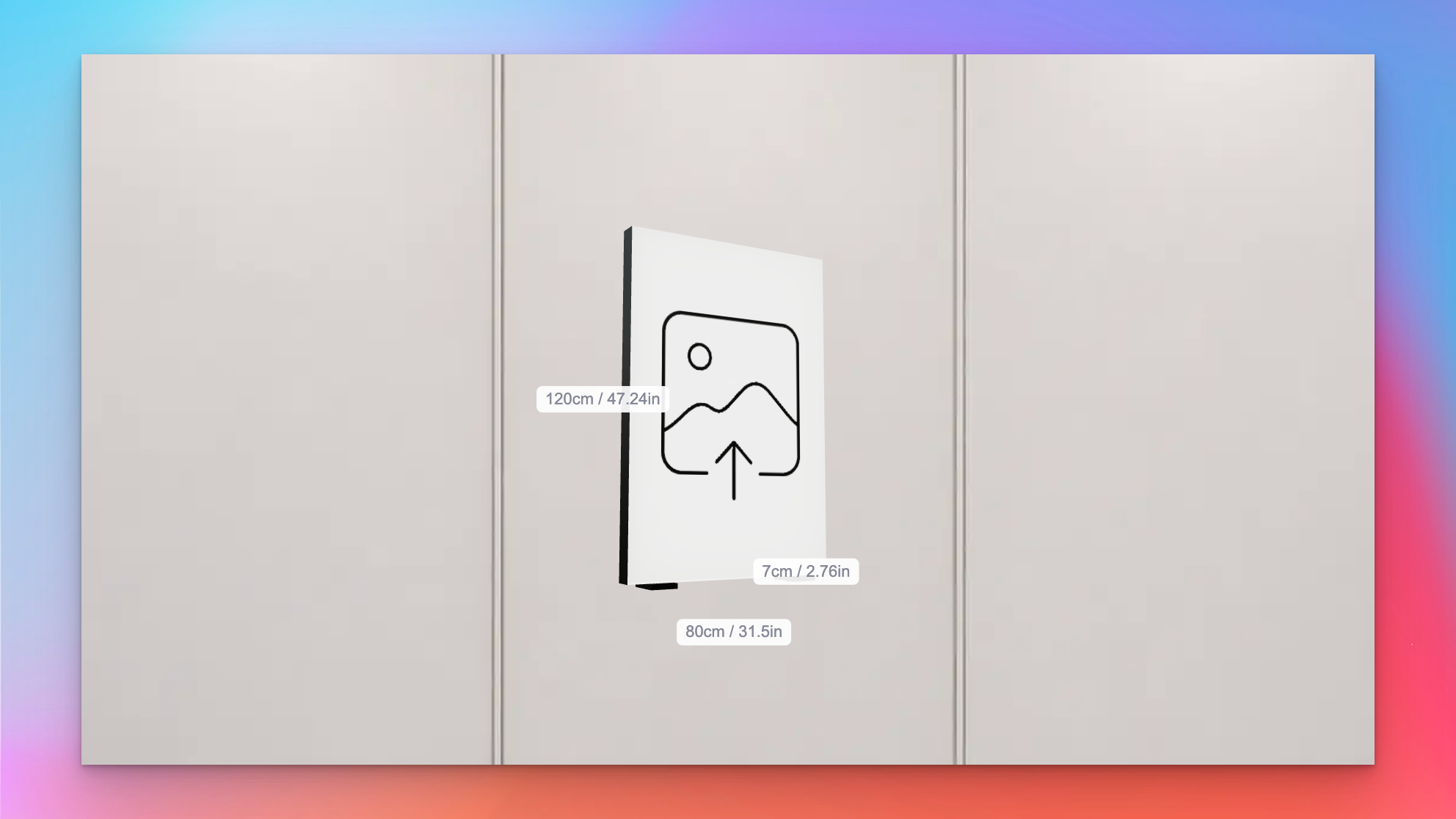
Lightbox 3D preview showing width, height, and depth labels in centimetres and inches

What’s Changed

  • Live measurement labels on the 3D previewWidth, height, and depth float next to the matching edges of the lightbox, so customers can see the physical size of the sign while they rotate and customise it
  • Metric, imperial, or bothLabels respect the customiser’s measurement system setting and can display in centimetres, inches, or both side by side for stores that ship to mixed markets
  • Individually toggleableEach dimension can be shown or hidden on its own, so merchants can surface only the measurements that matter for their product — for example, hiding depth on very slim signs
  • Accurate for custom sizesThe frame-fit custom size branch now feeds the same measurements through to the preview, so bespoke dimensions appear on the labels instead of falling back to the last preset size
Apr 22, 2026

2026.4

EPS and Illustrator-compatible vector exports

Sign Customiser now produces EPS and Illustrator-compatible PDF files alongside the existing SVG, so the designs you hand off to your production team land in whichever format their cutters, routers, and design software expect. No more chasing conversions between finalising a sale and sending the job to fabrication.

Once enabled for a customiser, the extra formats flow through the same channels as SVG today — customer design files, product images, manufacturer emails, and the admin font tool — with no extra steps for you or your customers.

What’s Changed

  • EPS downloadsUniversally supported across cutting, routing, and plotting software, so files drop straight into your fabrication workflow
  • Illustrator-compatible PDFOpens cleanly in Adobe Illustrator for designers who prefer to tweak artwork before production
  • Per-customiser togglesTurn EPS and Illustrator exports on only for the customisers that need them, keeping storage lean everywhere else
  • Manufacturer email linksNew download links appear in the custom design email sent to your production team whenever the formats are enabled
  • Admin font toolThe SVG generator in the admin now offers matching EPS and Illustrator downloads so you can pull finished artwork directly from the dashboard
  • AI sign designer filesUploaded logos processed through the AI sign designer are converted automatically once the settings are enabled

Apr 21, 2026

2026.4

Pedestal and sign feet mounting options for lightbox signs

Sign Customiser now supports floor-standing lightbox sign installations. Two new mounting visualisations — Pedestal and Sign Feet — render the sign the way it actually stands on the ground, so customers can picture a pylon-style sign on a forecourt or a freestanding lightbox on a counter before they buy. Merchants can fine-tune the proportions to match the hardware they ship.

What’s Changed

  • Pedestal mounting visualisationA vertical pole sits behind the lightbox with a base plate extending along the ground, giving customers a realistic preview of pylon-style and freestanding floor signs
  • Sign Feet mounting visualisationTwo feet mount under the lightbox, inset from each side edge, with base plates that extend in front and behind the sign for stability — ideal for countertop and tabletop lightboxes
  • Configurable dimensionsMerchants can tune the pedestal pole width and base depth, or adjust the sign feet base depth, post height, and inset from the edge, so the preview matches the mounting hardware they actually sell
  • Flush-mount sign feetSetting post height to zero renders feet flush against the bottom of the sign, supporting more compact tabletop designs
  • Accurate 3D previewThe new mounts render alongside the existing wall-mount and prong visualisations, giving customers a full picture of how their lightbox will look once installed

Apr 20, 2026

2026.4

Official Etsy integration

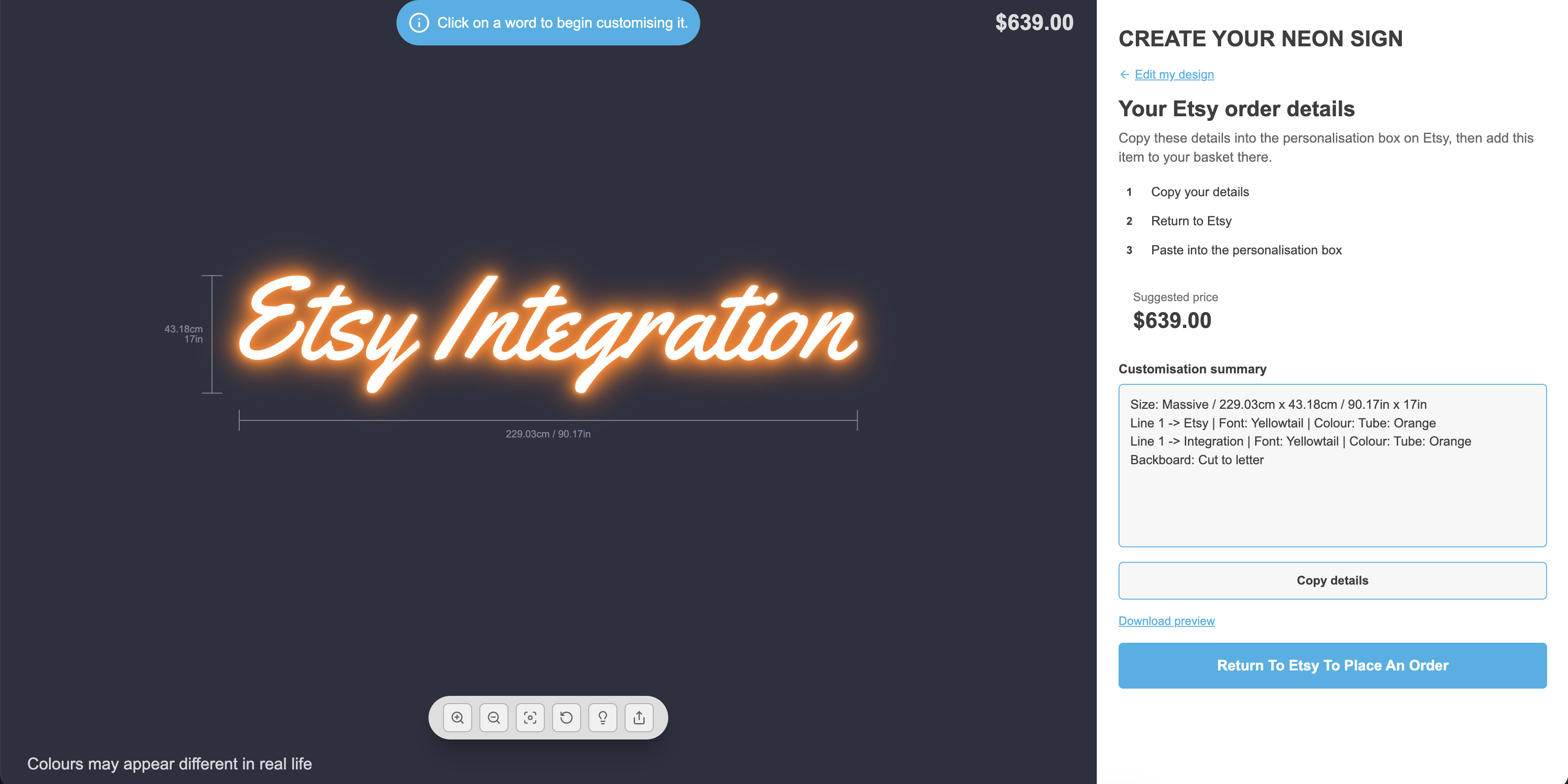
Sign Customiser now officially supports Etsy. Previously Etsy sellers had to piece together their own workarounds — from today, Etsy is a first-class integration you can activate once from the Integrations page, and every customiser you own can pair with your Etsy listings. Customers design their sign on your Customiser Link, copy a neatly formatted summary of their design, paste it into the Etsy personalisation box, and check out on Etsy as normal. No Shopify store required, and no back-and-forth emails to confirm the details.

Etsy order details summary shown alongside a customiser preview

What’s Changed

  • Official Etsy integrationActivate Etsy once from Integrations and it applies to every customiser you own, so there is no per-customiser toggle to manage
  • Listing settings per customiserPaste in an optional Etsy listing URL and choose whether to show the estimated price for each customiser
  • Structured design summaryCustomers get a clean, copy-ready summary covering size, every line of text, colours, and any selected options ready for the Etsy personalisation box
  • “Return To Etsy” call to actionA prominent button takes customers straight to your configured Etsy listing to complete their order
  • Optional price displayShow or hide the estimated price on the summary screen to match how you’ve priced the listing on Etsy
  • Etsy card in the adminA new Etsy card sits alongside your other integrations with step-by-step onboarding instructions
  • Works with hosted pagesAll customisers are automatically treated as Customiser Link compatible while Etsy is active, so you can share a single link with your Etsy buyers

Read the full walkthrough in our Etsy integration guide, or explore the Etsy integration overview to see how Sign Customiser pairs with Etsy listings.

Apr 19, 2026

2026.4

Clickable links in customiser descriptions

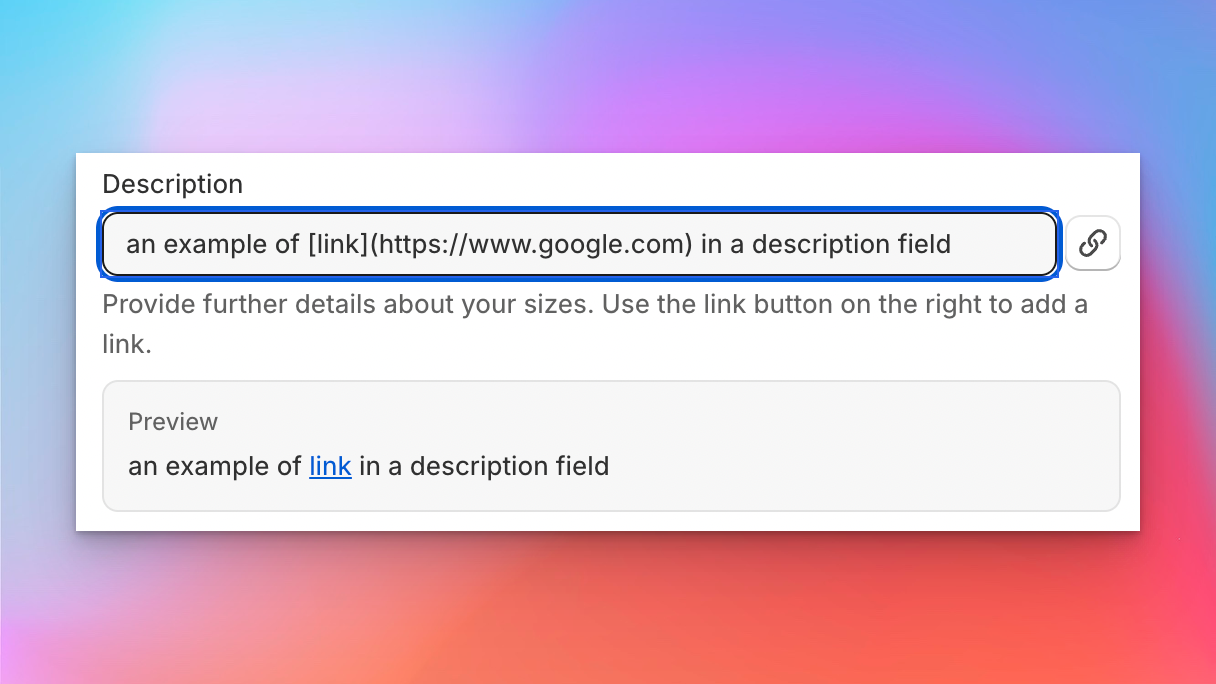
Sign Customiser now lets you add clickable links inside the descriptions and help text that customers read while they’re designing their sign. Point customers at a mounting guide, installation video, size chart, or a “contact us” link without ever taking them out of the flow, all using a simple Markdown link format your merchants will already recognise.

Admin description field showing Markdown link syntax and the rendered preview with a clickable link

This is a small quality-of-life upgrade that unlocks a lot: fewer support questions, better-informed buyers, and a cleaner way to surface the helpful content you already have on your store.

  • Markdown links in option descriptionsUse [label](url) inside descriptions for colours, sizes, materials, mounting, supports, jackets, product types, and custom form fields to turn any word or phrase into a link
  • Links render safely for customersCustomer-facing descriptions automatically become clickable, opening external links in a new tab and keeping internal or anchor links in the same tab
  • Supports the link types you actually useWorks with full URLs, your own store paths like /pages/mounting-guide, in-page anchors, mailto: email links, and tel: phone links
  • Inline admin hintEvery supported field now shows a short help note with example syntax, so merchants can see at a glance how to add a link without leaving the form
  • Plain text still works as beforeExisting descriptions keep rendering exactly as they do today, so there’s nothing to migrate

Apr 15, 2026

2026.4

UTM parameter tracking for marketing attribution

Sign Customiser now automatically captures UTM parameters — utm_source, utm_medium, utm_campaign, utm_term, and utm_content — from your customers’ browsing sessions and threads them through to your form submissions, notification emails, and webhook payloads. This gives you full visibility into which marketing campaigns are driving quote requests and sign orders.

What’s Changed

  • Automatic UTM captureUTM parameters are detected from the storefront URL and persisted in session storage so they survive page navigation
  • UTM data in form submissionsQuote requests and custom design submissions now include UTM tracking data, so you can attribute every lead to the campaign that brought them in
  • Marketing attribution in order emailsMerchant notification emails now display a UTM tracking section when parameters are present, making it easy to match enquiries to campaigns
  • Webhook enrichmentUTM parameters are included in webhook payloads, allowing your CRM, analytics tools, or automation workflows to process attribution data automatically
  • Cross-iframe supportUTM data is correctly passed through to the customiser when embedded via iframe on Shopify, WooCommerce, or hosted pages

Apr 15, 2026

2026.4

Automated pricing updates via the API

Sign Customiser’s API now supports full pricing management, giving merchants the ability to read and update their customiser pricing automatically. Whether you’re a power user running scheduled scripts or a merchant looking to keep pricing in sync with your business systems, this update puts you in control.

Rather than manually adjusting prices through the dashboard each time costs change, you can now automate the process entirely. Build a scheduled task that pulls your latest supplier rates and pushes updated pricing to Sign Customiser, or connect your inventory system to adjust prices in real time as material costs fluctuate.

What’s Changed

  • Read pricing via APIRetrieve the full pricing configuration for any customiser, including sizes, base pricing, and price lists
  • Update pricing via APIReplace pricing configuration automatically with a single PUT request, covering base prices, letter prices, size tiers, and price lists
  • Works with all pricing modelsSupports Fixed Width, Material Length, and Frame Fit pricing models

Example Use Cases

  • Shipping cost updatesShipping rates change regularly. Set up a scheduled task that fetches your latest carrier rates and automatically updates shipping surcharges across all your customisers, so customers always see accurate totals
  • Seasonal pricingRun a cron job that applies seasonal pricing adjustments at specific dates, such as holiday surcharges or off-peak discounts, without lifting a finger
  • Supplier cost syncWhen your material supplier updates their price sheet, a script can recalculate your margins and push new pricing to every affected customiser in seconds
  • Multi-currency adjustmentsAutomatically adjust pricing based on daily exchange rates for international storefronts
  • Bulk price changesUpdate pricing across dozens of customisers at once from a single script, instead of editing each one individually

For implementation details and API reference, visit our Custom API Integration guide.

Apr 10, 2026

2026.4

Export orders as CSV via email

Sign Customiser now lets you export your orders as a CSV spreadsheet, delivered directly to your email. Whether you need last month’s orders for bookkeeping, a full year for reporting, or a custom date range for a specific campaign — just pick a range, hit export, and the file will land in your inbox within minutes.

What’s Changed

  • One-click preset rangesQuickly export orders from the last 7 days, last 30 days, last quarter, or all time without touching a calendar
  • Custom date range pickerUse the built-in calendar to select any start and end date for a tailored export
  • Delivered to your inboxExports are processed in the background and emailed as a CSV attachment to the address on your account, so you can keep working while it runs
  • Detailed order dataEach row includes customer details, sign configuration, pricing, and all selected options so you have a complete picture of every order

Apr 8, 2026

2026.4

Slim lightbox designs with recessed borders

Sign Customiser now fully supports slim lightbox designs inside the customiser. If your lightbox signs only illuminate from one side — like a wall-mounted sign that doesn’t need a lit back panel — the 3D preview now accurately reflects this by showing the border trim on any disabled sides. You can also enable recessed borders for a cleaner, more modern look where the border sits flush with the face rather than overlapping it.

Slim lightbox sign preview in the customiser

What’s Changed

  • Slim (single-sided) lightbox supportLightbox signs with inactive sides are now officially supported in the customiser. Disabled sides display the border colour instead of a lit panel, giving customers an accurate preview of how the finished sign will look
  • Recessed border optionA new setting allows merchants to enable recessed borders on lightbox signs, removing the visible trim overlay from the face and back panels for a sleek, frameless appearance
  • Accurate 3D previewThe lightbox renderer correctly hides glow effects and images on inactive sides, so the preview matches the real product — whether it’s a single-sided wall sign or a fully illuminated hanging lightbox
  • Works across all lightbox shapesBox, circle, and oval lightbox shapes all support inactive sides and recessed borders
  • Automatic border trim enforcementThe admin and customiser now ensure lightbox signs always have the required border trim colour assigned, preventing incomplete configurations from reaching your customers

Apr 5, 2026

2026.4

AI Sign Designer now supports Material Length pricing

The AI Sign Designer just got a major expansion. Merchants using the Material Length pricing model can now offer AI-powered sign design directly in their customisers, opening up precise, path-based pricing for customer-uploaded artwork and AI-generated designs. We’ve also expanded Channel Letter sign support and made it faster than ever to get started with new demo templates.

Update, 1 October 2026:From 1 October 2026, AI Sign Designer V2 does not add a UV print to new neon designs. Designs that already have a UV print keep it. The manual UV print options do not change. See AI neon designs now show as lit tubes.

What’s Changed

  • Material Length pricing meets AI Sign DesignerCustomisers using the Material Length model can now accept AI-generated SVG designs with accurate per-letter measurements and pricing. Customers upload an image or describe their sign, and the AI produces a design that’s measured and priced using your existing material length rules
  • Channel Letter signs work with AI Sign DesignerChannel Letter product types are now fully supported in the AI Sign Designer flow, including face and halo colour effects, RGB options, and UV print colour preservation
  • UV print colours preserved from AI artworkWhen a customer uploads a multicolour design, the original fill colours from the AI artwork are automatically carried through as UV face print data, so what the customer sees in the preview matches what goes to production
  • New demo templates for faster setupThe customiser creation flow now includes AI Sign Designer demo data for eligible product types, so merchants can launch a fully configured customiser with AI design capabilities in just a few clicks
  • Streamlined onboardingThe standalone onboarding card has been replaced with an integrated setup experience that seeds AI Sign Designer settings alongside your demo data, reducing the steps needed to go live

Open original

Get started

Add Sign Customiserto your store today

Install now
36+ verified reviews

Login

Universal Sign In
  • WordPress
  • Wix
  • Etsy
  • Squarespace
  • Webflow

Or, if on Shopify, navigate to your store admin to login.