NewTurn any image into a sign design.
Changelog

Changelog

Documenting our journey of creating a custom sign builder.

Filtered by:feature(185 updates)Page 8 of 19

Stay informed with updates every month

Or subscribe to ourRSS feed

Mar 31, 2026

2026.3

RGB Colour Options for Channel Letter Signs

Sign Customiser now brings the popular RGB colour effect to channel letter signs. Your customers can select RGB as a face or halo colour option and see a smooth, animated colour transition directly in the live preview — helping them visualise exactly how their sign will look with colour-changing LEDs before they buy.
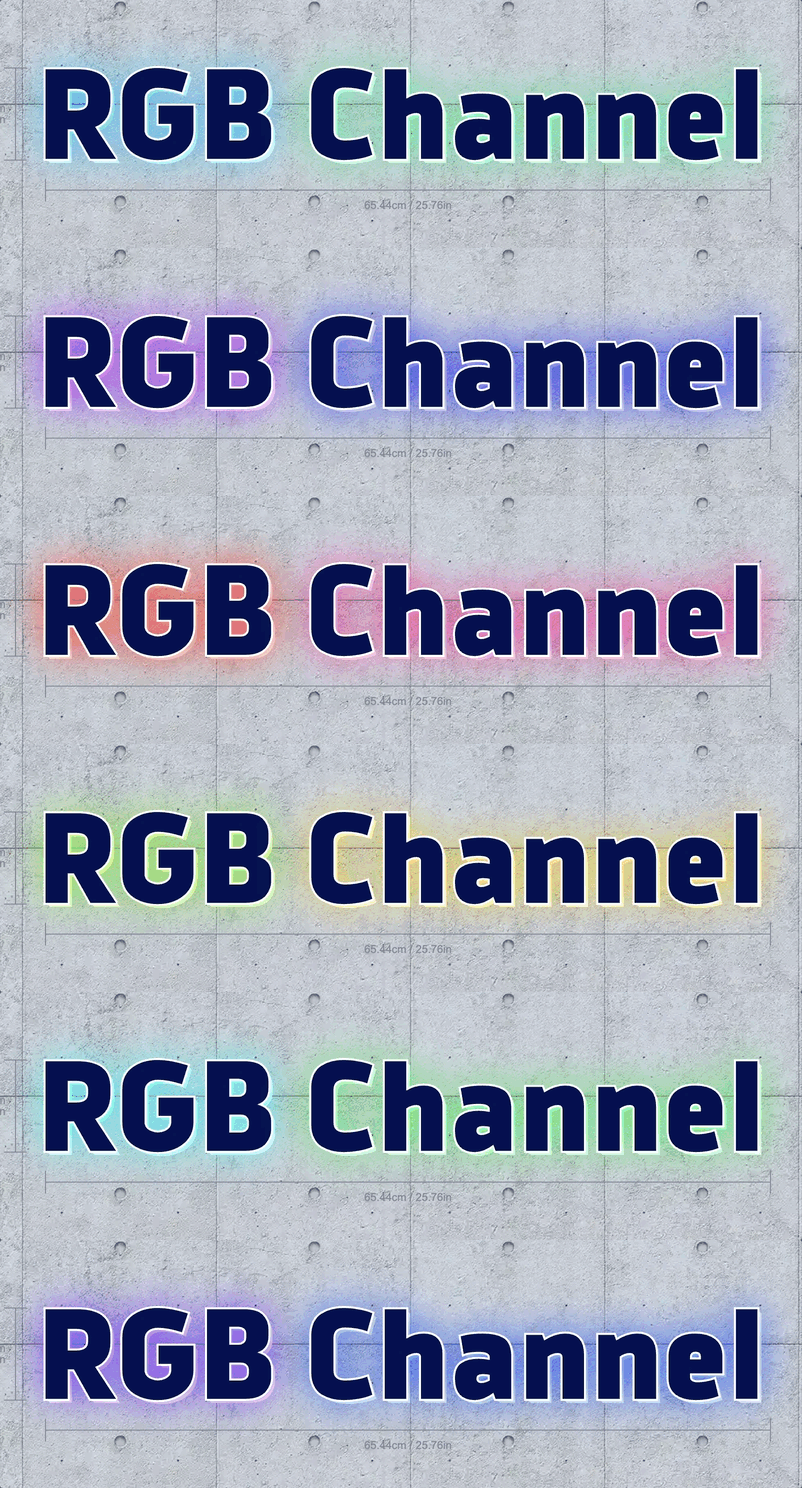
RGB colour option animating across a channel letter sign preview

What’s Changed

  • RGB colour option for channel lettersCustomers can now choose an RGB multi-colour option for both the face and halo colours on channel letter signs, complete with an animated preview that cycles through the full colour palette
  • Animated colour transitionsThe live sign preview smoothly blends between colours in real time, giving customers a realistic sense of how RGB LED lighting will look on their finished sign
  • Colour preview swatches for all product typesThe rainbow gradient colour swatch that previews multi-colour options is now available across all product types, not just neon signs
  • Built-in demo dataNew channel letter customisers come pre-loaded with an RGB option on both face and halo colour palettes, priced at a 10% uplift by default so you can start selling immediately
Mar 31, 2026

2026.3

Optional letter parts can default to none

Sign Customiser now lets merchants control whether optional letter parts — like face colours or lighting effects — are pre-selected or left blank when a customer first opens the customiser. This gives you more flexibility over the initial sign preview and can simplify the buying experience for products where certain parts are truly add-ons.

What’s Changed

  • New “Default to none” settingWhen editing an optional colour selection in the admin, a new checkbox lets you choose whether the part starts unselected when the customiser loads
  • Cleaner starting experienceCustomers see a simpler sign preview by default and can add optional parts as they explore, rather than needing to remove pre-selected options
  • Backwards compatibleExisting optional parts continue to behave exactly as before, pre-selecting the first available colour

Mar 31, 2026

2026.3

Letter Rail Backboard Now Available

Letter rail sign preview in the customiser

You can now add a Letter Rail backboard to any channel sign customiser. Letter rail backboards display individual letters mounted on a sleek rail, offering a modern and versatile look without needing to set up a separate sign type.

What’s Changed

  • New Letter Rail backboard optionLetter Rail is now available as a backboard support type alongside Board, Raceway, Stand and Cut to Shape, configurable from the backboard editor on any channel sign customiser
  • Configurable bar height and gapControl the rail thickness and the spacing between the rail and the letters from the backboard padding settings
  • Automatic style inheritanceLetter rail backboards can inherit the same face colour and glow effects from the letters, ensuring a cohesive look without any extra configuration

Mar 30, 2026

2026.3

Expanded global font support

Sign Customiser’s font engine has been completely upgraded to support a much wider range of international fonts and scripts. Customers designing signs in Arabic, Hebrew, Chinese, Japanese, Korean, and other non-Latin languages will now see accurate letter rendering, correct text shaping, and reliable measurements — opening up your customiser to a truly global audience.

What’s Changed

  • Thousands more compatible fontsThe customiser now works with a significantly broader range of modern font formats, unlocking thousands of additional fonts from Google Fonts and custom uploads
  • Right-to-left language supportArabic, Hebrew, and other RTL scripts now render correctly with proper letter joining, ligatures, and contextual shaping
  • Accurate international measurementsSign dimensions and pricing are now calculated accurately for complex scripts where characters change shape based on their position in a word
  • Better multi-language signsMixing fonts from different languages on the same sign now produces more consistent sizing and spacing
  • Improved font cachingFonts load faster on return visits with more reliable caching, even when customers navigate away and come back to the customiser

Mar 24, 2026

2026.3

Google Ads click ID tracking for sign orders

Sign Customiser now automatically captures Google Ads click IDs (gclid, gbraid, and wbraid) from your customers’ sessions, giving you full visibility into which ad campaigns are driving sign orders and quote requests.

What’s Changed

  • Automatic click ID captureGoogle Ads click IDs are detected from URL parameters, cookies, and session storage so no customer interaction is missed
  • Click IDs included in form submissionsQuote requests and custom design submissions now pass ad tracking data through to your order emails and webhooks
  • Ad tracking in order emailsMerchant notification emails now display Google Ads click IDs when available, making it easy to match orders to campaigns
  • Event tracking enrichmentThe spc:product-created and spc:form-submitted JavaScript events now include ad click IDs, so your existing conversion tracking scripts can access them
  • Cross-iframe supportClick IDs are correctly passed through to the customiser even when embedded via iframe on Shopify, WooCommerce, or hosted pages

Mar 18, 2026

2026.3

Option to disable size limit popup

Sign Customiser now gives merchants the ability to disable the size limit popup that appears when customers exceed maximum sign dimensions. This new setting provides greater control over the customer experience, allowing merchants who prefer a less restrictive design flow to remove the interruption while still enforcing size limits in the background.

What’s Changed

  • New admin settingA “Disable size limit popup” checkbox has been added to the customiser settings panel, giving merchants a simple toggle to control popup visibility
  • Smoother design experienceWhen enabled, customers can continue designing without being interrupted by the “Size is over the limit. Contact us for a quote” modal
  • Backward compatibleThe setting defaults to off, so all existing customisers continue to behave exactly as before

Mar 4, 2026

2026.3

RGB flow glow effect with spatial gradient animation

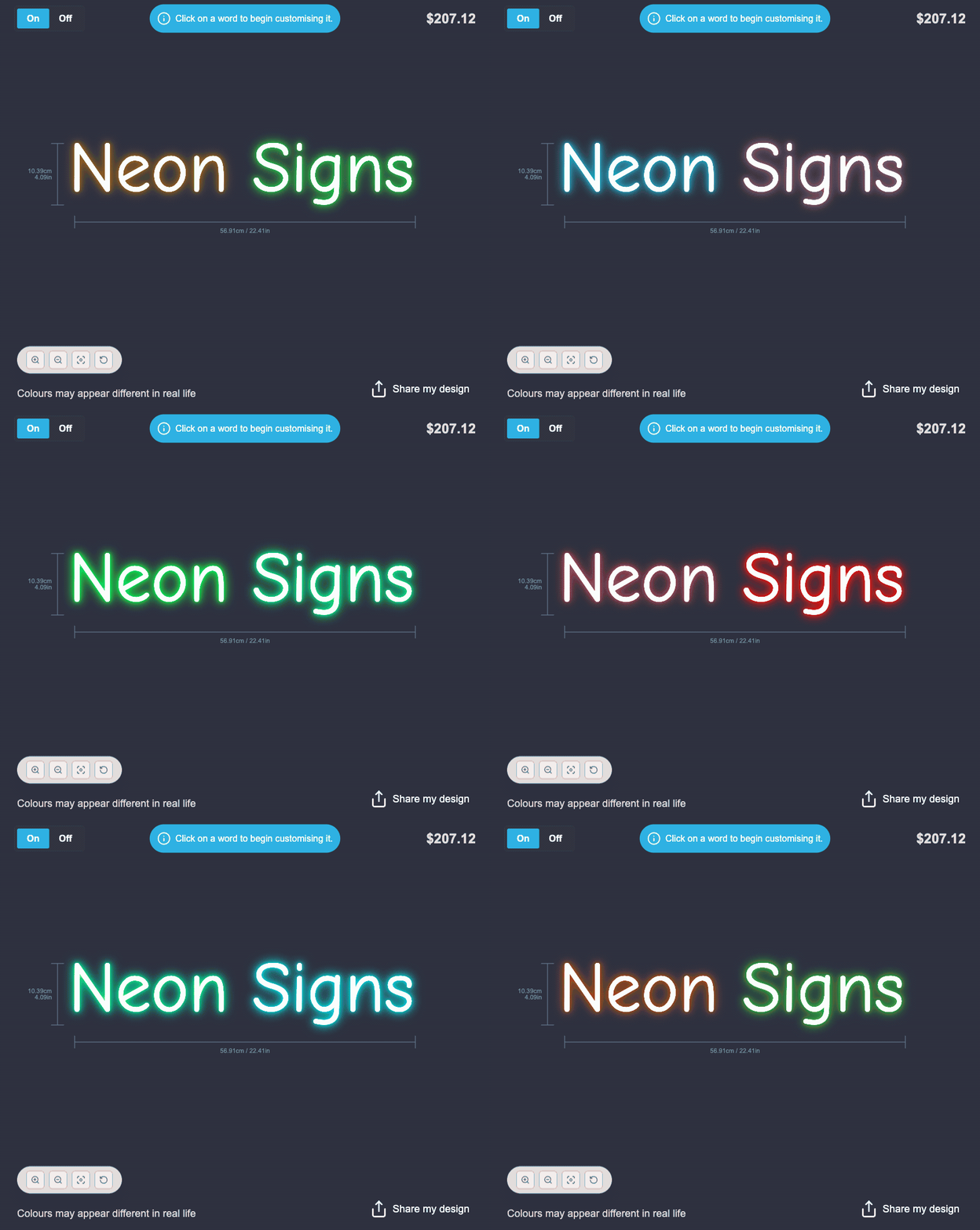
Sign Customiser’s Flow RGB effect now produces a beautiful, realistic neon glow that flows across your entire sign. Each word is lit with a smooth colour gradient that shifts naturally based on its position, creating the appearance of real RGB LED tubing cycling through colours in sequence.

RGB flow glow effect in action

What’s Changed

  • Multi-layer neon glowFour glow layers create a rich, realistic neon tube appearance with soft light falloff that closely mimics real RGB LED signage
  • Spatial gradient animationColours flow smoothly across words based on their position on the canvas, so multi-word signs display a natural colour wave rather than each word changing independently
  • Optimised for all devicesFrame throttling and reduced glow layers ensure smooth performance on mobile devices and Safari, without sacrificing visual quality
  • White face with coloured glowThe text itself remains crisp white while the surrounding glow cycles through your chosen RGB colours, just like real neon tubing

No action is needed on your end — this effect applies automatically to any customiser that already uses the Flow RGB colour effect.

Feb 27, 2026

2026.2

Major upgrade to AI Sign Designer image capabilities

The AI Sign Designer has received its biggest image processing upgrade yet. Our underlying models have been significantly improved, delivering noticeably better results across virtually every type of image your customers upload.

Whether it’s a photograph, a hand-drawn sketch, a detailed graphic logo, or a simple wordmark, the AI Sign Designer now interprets and converts images with greater accuracy and fidelity than ever before.

What’s Changed

  • Better photographic image handlingPhotos and real-world images are now interpreted with far greater detail, producing cleaner and more accurate sign-ready conversions
  • Improved logo and graphic interpretationComplex multi-element logos, icons, and brand graphics are converted more faithfully, preserving fine details and maintaining the integrity of the original design
  • More accurate shape detectionIntricate patterns, overlapping elements, and visually dense designs are now handled with significantly improved precision
  • Broader image type supportFrom minimalist line art to richly detailed illustrations, the AI Sign Designer now handles a wider range of visual styles with consistently better output
  • Higher quality results overallEvery conversion benefits from the upgraded models, meaning your customers see better previews and you receive more production-ready files

Feb 26, 2026

2026.2

Submit feature ideas directly from your dashboard

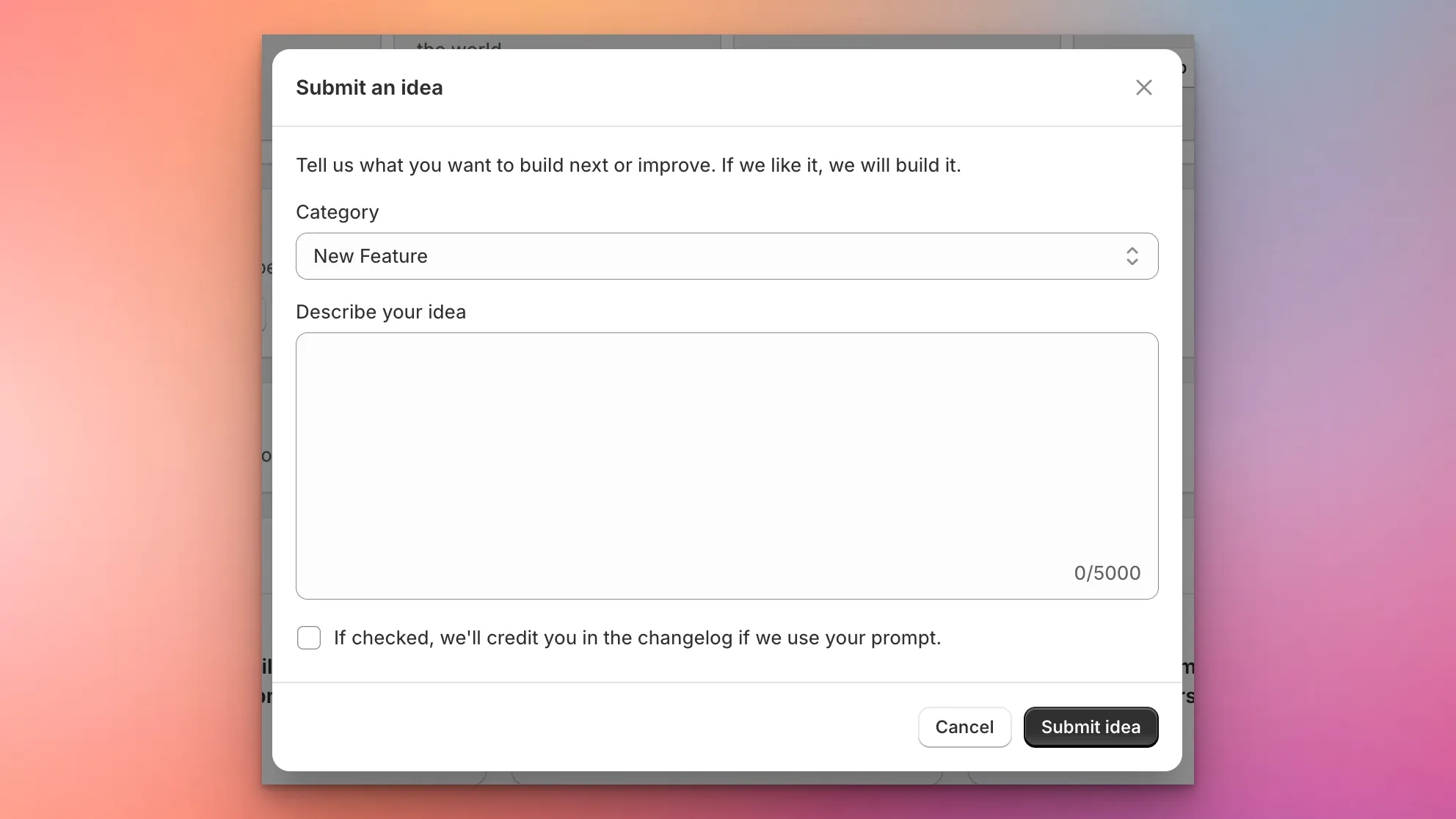
Sign Customiser now makes it easier than ever to shape the product roadmap. A new “Submit an Idea” card on your dashboard lets you describe the features, enhancements, integrations, or fixes you want to see — and our team will review every submission and create an implementation plan.

Submit an idea modal

What’s Changed

  • In-app idea submissionA new card on the dashboard opens a modal where you can describe your idea in detail, with up to 5,000 characters
  • Categorised requestsChoose from New Feature, Enhancement, Integration, Bug Fix, or Other so your idea reaches the right team
  • Automatic planningEvery submission triggers an internal review and implementation plan, so your ideas move from concept to action faster
  • Changelog credit opt-inA checkbox lets you opt in to being credited in the changelog if we ship a feature inspired by your idea

Feb 26, 2026

2026.2

Customiser Presets — Save and Load Sign Configurations

Sign Customiser now lets you save any sign configuration as a reusable preset. Whether you want to showcase your most popular designs, simplify the buying experience for returning customers, or promote seasonal collections, presets make it easy to offer ready-made starting points directly from your storefront.

What’s Changed

  • Save designs as presetsPreview any sign configuration in the admin panel and save it as a named preset with a single click, capturing the full design including text, colours, fonts, sizes, and selected options
  • Manage presets from the adminA new Presets page in the customiser sidebar lets you view, rename, reorder, and delete your saved presets at any time
  • Load presets on the storefrontShare a direct link to any preset using its unique code, and customers will see the customiser pre-filled with your chosen configuration, ready to personalise further
  • Theme app extension supportPresets integrate with the Shopify theme app block, so you can embed preset-specific customiser links directly into your store pages and collections
  • Drag and drop reorderingOrganise your presets in the exact order you want them displayed using the familiar drag-and-drop interface

Open original

Get started

Add Sign Customiserto your store today

Install now
36+ verified reviews

Login

Universal Sign In
  • WordPress
  • Wix
  • Etsy
  • Squarespace
  • Webflow

Or, if on Shopify, navigate to your store admin to login.